Beta

This is a new service and pages are being tested and improved.

Overview

Dialog modals stop the user’s current task by covering the page and asking for an immediate response. They block interaction with the page until the user takes action.

Only use a dialog modal when you need the user to make an essential decision or task.
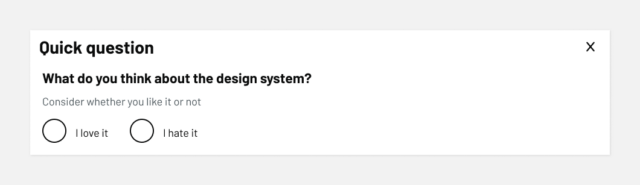
Example

A modal dialog titled ‘Quick question’ with the text ‘What do you think about the design system?’ followed by a note that says ‘Consider whether you like it or not.’ Below are two radio button options: ‘I love it’ and ‘I hate it.’ There is a close button (X) in the top-right corner.

When to use

Use the dialog modal when you need to:

  • display critical system messages that require an immediate response, like a session timeout
  • collect important information that blocks the user’s current task, like needing to sign in
  • ask for feedback
  • submit a one question form

Only use modals when the interruption is necessary and the content relates to the user’s current task.

When not to use

Avoid the dialog modal when:

  • information is helpful but not critical, use a notification banner or inset text instead
  • you’re showing general error or success messages
  • content requires scrolling or contains complex forms, create dedicated pages for these
  • you want to collect optional feedback, use the on-page feedback form
  • the content involves a multi-step process
  • users haven’t triggered the action

For explanatory content or definitions, use the details component.

Content notes

Write modal content that gets straight to the point:

  • start with a clear heading that explains what’s happening
  • explain the consequences of actions in simple terms
  • use specific button text that describes the action
  • keep content to 2-3 sentences

For acknowledgement modals, disable the close button and provide clear accept or reject options instead.

Back to top