Beta

This is a new service and pages are being tested and improved.

Overview

An accordion lets users show and hide sections of related content on a page by selecting expandable headers.

It reduces visual clutter by letting users focus on what they need without scrolling through everything.

Use it when users can scan to find specific information quickly, and won’t need to read the whole page.
Example

Accordion item content.

Accordion item content.

When to use

Use the accordion component when you need to:

  • present content where users typically only need a few specific pieces of information
  • reduce page length on mobile devices where scrolling through long pages is harder
  • organise standalone sections that don’t require comparison
  • help repeat users quickly access familiar information, such as returning to check something

When not to use

Avoid the accordion component when:

  • users need to see most or all content
  • content is minimal, as this adds unnecessary interaction
  • users need to compare information across sections
  • content has multiple nested levels
  • you cannot write clear, descriptive headings

Steps-style accordion

A steps-style accordion presents content in sequential, step-by-step format where each accordion item represents a distinct process step.

Users can navigate between steps to view the content they need for the step they’re on

Use it to guide users through step-by-step processes where they focus on one stage at a time

Example

Step 1

Accordion item content.

Step 2

Accordion item content.

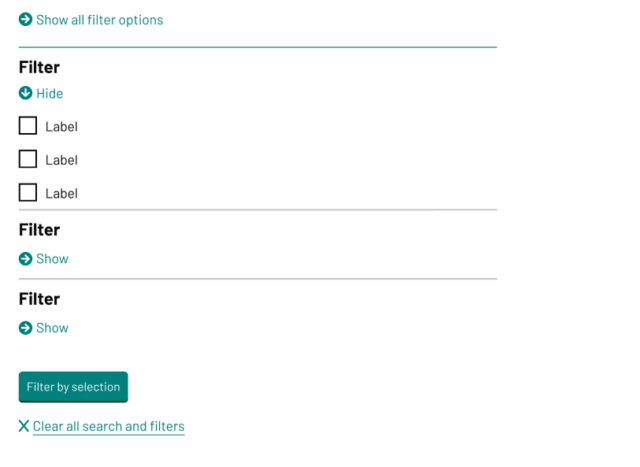
Filters accordion

The filters accordion variation organises multiple filtering options in collapsible sections, which is used on catalogue page templates, like the library, jobs board and learning library. This variation should only be 33% of the main content width.

Example

Filters accordion

Content notes

Write clear, descriptive accordion headings that tell users what they’ll find.

Structure content with paragraphs and subheadings as needed, but ensure each item stands alone. Do not require users to open other accordion items to understand the current one.

Avoid multimedia content, content that requires horizontal scrolling, or other components within an accordion item.

When using subheadings within accordion item content, start at heading level 3 to maintain correct document structure.

Add an introductory sentence or heading above the accordion if users need context before choosing which sections to open.

Back to top